Changelog
Every update to SnapFrame, from new features to bug fixes and improvements.
v1.9.6
July 28, 2026| Type | Description |
|---|---|
| Added | Zendesk ticket attach (Pro) — connect with official OAuth, then attach the current capture to an existing ticket with an optional internal note |
| Changed | PDF export now uses a local JPEG→PDF writer (jsPDF removed) to meet Manifest V3 remotely-hosted-code requirements |
v1.9.0
July 22, 2026| Type | Description |
|---|---|
| Added | Product analytics — install and update events sync to PostHog (same project as getsnapframe.online) for website → install → purchase funnel measurement |
v1.8.0
July 10, 2026| Type | Description |
|---|---|
| Added | Numbered step annotations — click to place auto-incrementing callouts (1, 2, 3…), drag to reposition, dashed connectors, and auto-renumber on delete |
v1.7.6
July 6, 2026| Type | Description |
|---|---|
| Fixed | Pro license no longer drops after 24 hours — status now re-validates automatically when the license token expires |
v1.7.2
July 5, 2026| Type | Description |
|---|---|
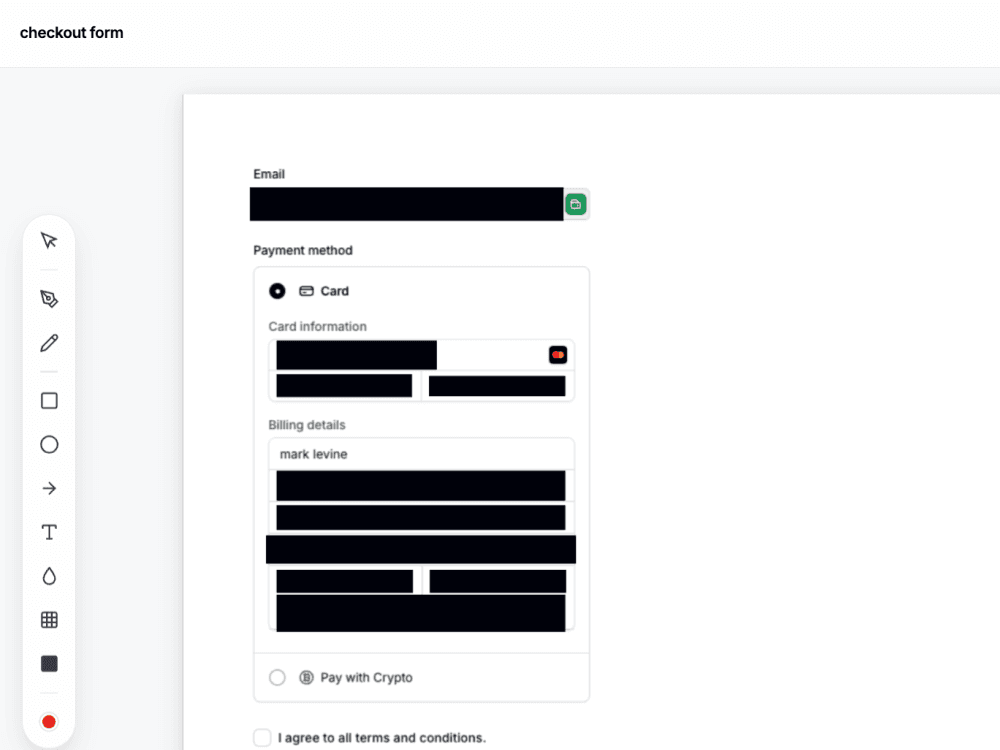
| Added | Auto-redact (Pro) — on-device heuristics detect and mask emails, phones, SSNs, credit cards, password fields, and address fields on capture |
| Added | Checkout iframe support — recursive coordinate tracing for Stripe and nested payment frames |
| Changed | Auto-redact masks now use solid opaque black boxes for complete unreadability |
v1.7.1
July 4, 2026| Type | Description |
|---|---|
| Added | Manual redact tools — pixelate, solid box, and improved blur for masking sensitive regions |
v1.6.0
July 1, 2026| Type | Description |
|---|---|
| Added | In-extension Pro checkout via Paddle — monthly, yearly, or lifetime plans from the Account panel |
| Changed | License keys continue to activate Pro the same way; existing Whop keys still work |
v1.5.5
June 30, 2026| Type | Description |
|---|---|
| Added | Capture Visible Area (Alt+V) — screenshot only what's on screen, no scroll or stitch |
| Added | Draw Region (Alt+R) — freeform rectangle selection within the viewport |
| Added | Keyboard shortcuts: Alt+S full page · Alt+V visible · Alt+R region (rebindable in Chrome) |
v1.5.0
June 23, 2026| Type | Description |
|---|---|
| Added | Cloud Library (Pro) — save and sync captures with full edit state across devices |
| Added | Side-by-Side comparison tool (Pro) |
| Changed | Redesigned editor toolbar with consolidated annotation panel |
| Fixed | Full-page capture failing on pages with sticky headers that overlap content |
v1.4.0
May 15, 2026| Type | Description |
|---|---|
| Added | Social Resizer — one-click reframe for Instagram, TikTok, LinkedIn, and more |
| Added | Rounded Corners tool with live preview slider |
| Added | Caption Bar with source label, custom text, and capture date |
| Changed | Increased undo history from 25 to 50 steps |
v1.3.0
April 2, 2026| Type | Description |
|---|---|
| Added | Element Picker — hover-and-click capture of individual DOM elements |
| Added | Draw Region — freeform rectangle selection for partial captures |
| Added | Keyboard shortcuts: Alt+V (visible area), Alt+R (draw region) |
| Fixed | Crop tool snapping incorrectly on high-DPI displays |
v1.2.0
February 10, 2026| Type | Description |
|---|---|
| Added | Workspace — upload and edit external images with full annotation suite |
| Added | Copy to Clipboard — paste screenshots directly into Slack, Figma, Docs |
| Added | WebP export format alongside existing JPG |
| Changed | Improved full-page capture speed with parallel frame processing |
v1.1.0
December 5, 2025| Type | Description |
|---|---|
| Added | Annotation tools: shapes (rectangle, circle, arrow, line), freehand pen, highlighter |
| Added | Text tool with font family picker (Inter, Shantell Sans, Geist) |
| Added | Blur/Redact tool for manual sensitive-data masking |
| Fixed | Popup not opening on certain HTTPS pages with strict CSP headers |
v1.0.0
October 20, 2025| Type | Description |
|---|---|
| Added | Initial release of SnapFrame for Chrome |
| Added | Full-page screenshot capture with auto-scroll and stitch |
| Added | Visible area capture |
| Added | Crop tool with 16:9, 4:3, and freeform modes |
| Added | JPG and WebP export with unlimited free downloads |
| Added | Pro licensing with PNG and PDF export |
Secure extension
Stop tab-hopping for one screenshot
Capture, redact, and document — all in your browser, all in SnapFrame.
Start free. No account, no card, no catch.